POTATO LAUNCHER
Made by the bands,
for the bands.
One place to get the whole band ready.
Brought to you by the maestros behind the Manglers and Potatoes.
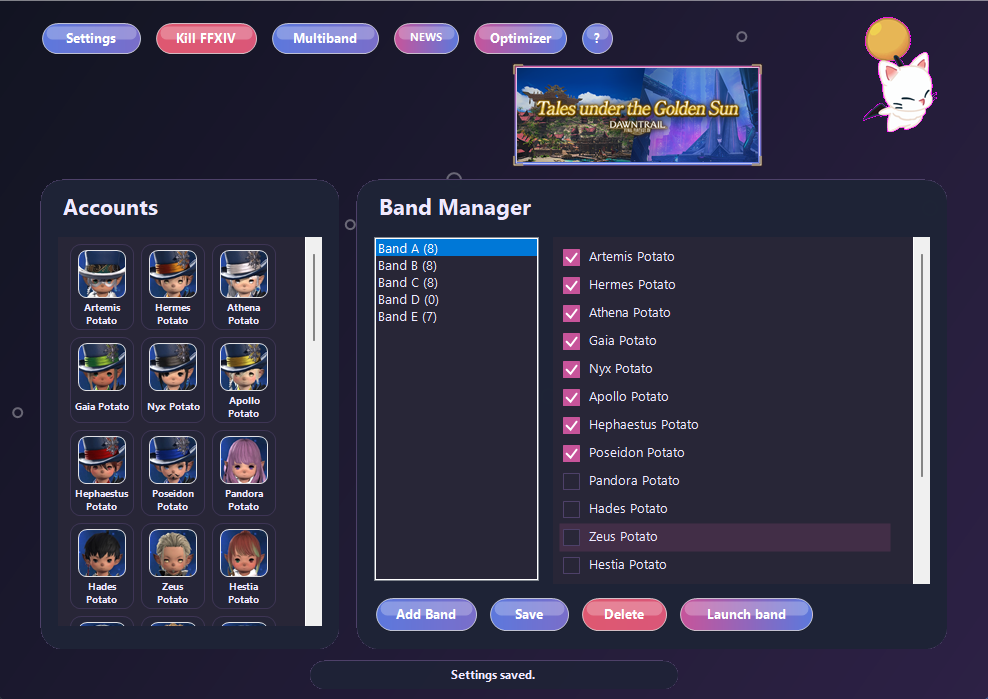 1. OptimizationMake better use of limited cores. Manage CPU allocation across main and follower clients, with adaptive shared pools and automatic CPU and RAM controls.2. Lodestone portraitsLink your characters to Lodestone. Their portraits refresh when the launcher starts, or when you refresh them manually. Open the linked profile from the account menu.3. Official newsRead the latest official FFXIV news from the launcher. The image banner brings current announcements into view.4. MultibandPair two trusted PCs on your private network and coordinate a band launch on each.5. Saved bandsKeep named lineups ready. Choose a band and check which accounts belong to it.6. Launch bandLaunch the lineup in order, skipping recognizable clients already running on that PC. Clients at generic login screens may not be identified.
More clients. More control.
CPU allocation. Memory controls. Live monitoring.
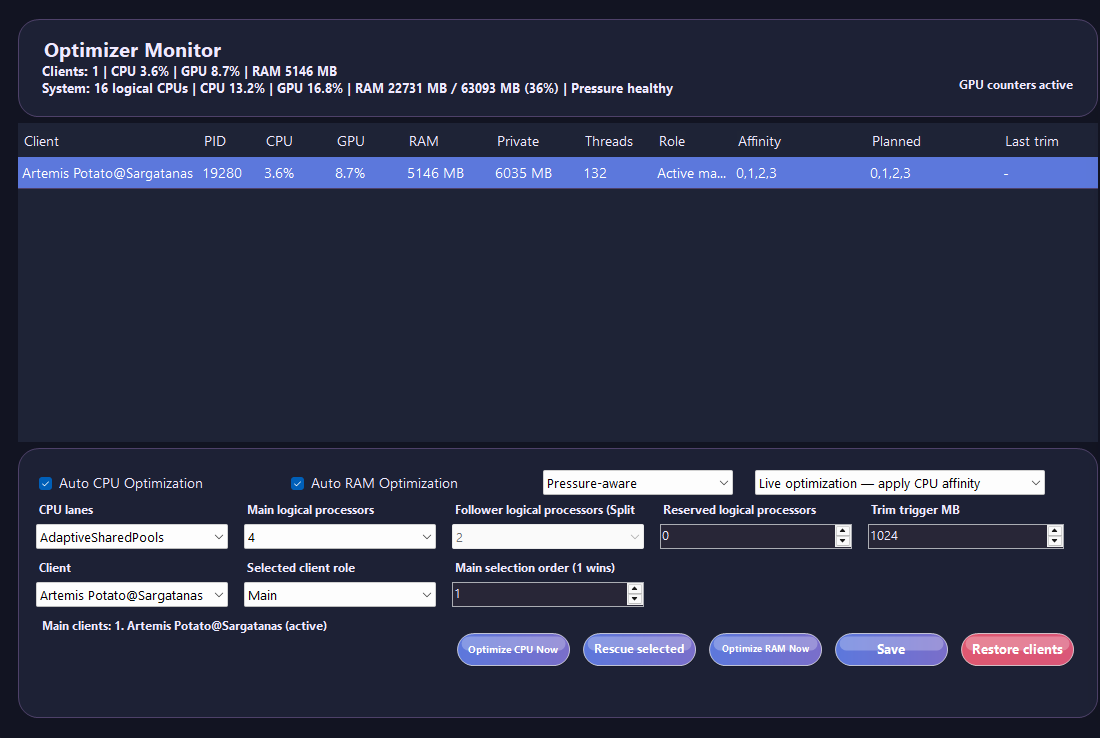 Live monitoringSee CPU, GPU and memory use per client, together with the system load and memory-pressure status.CPU allocationChoose CPU lanes and processor counts for main and follower clients. The app discovers the available logical processors on this PC.RAM controlsUse pressure-aware RAM optimization to manage client memory when your system is under pressure.Planning or livePlanning mode shows proposed CPU assignments without applying them. Live mode applies CPU affinity changes.
And much more !
Built for our band. Ready for yours.
Is it really free?
Yes! Potato Launcher is a love letter to every band looking for more control and flexibility over their setup.
Who is Potato Launcher for?
FFXIV players who want one place to launch and manage their accounts—from a single character to a full multibox setup. Built by a band, but you do not need to own one.
What does the optimizer do?
Make better use of the cores you have. The optimizer manages CPU allocation across your clients, with separate main and follower roles and adaptive shared pools for busy multiclient setups. It is especially useful when several clients are competing for limited cores. Automatic CPU and pressure-aware RAM controls let you keep your settings in place, while the monitor shows how your clients are doing.
Do Lodestone portraits update automatically?
Linked portraits refresh when Potato Launcher starts. You can also refresh them manually and open the linked Lodestone profile from the account menu. Changes depend on what Lodestone has published; this is not a continuous live feed.
Where does the news come from?
The integrated news feed and image banner show official FFXIV announcements, so you can catch up without leaving the launcher.
Can I launch bands on two computers?
Yes. Open Multiband on both PCs, pair them using the displayed code, then save a launch plan with a band from each computer. Use a trusted private network. Local account files and credentials stay on their original PC.
What if a character is already logged in?
Band launches skip matching clients already running on that PC. Detection depends on recognizable character information. Generic login screens or clients running on another computer cannot be treated as a confirmed local match.
Can Potato Launcher be my everyday launcher?
Yes. Set up XIVLauncher as the foundation, connect your accounts once, and use Potato Launcher for your everyday launches. You do not need to manage a band: it works for individual accounts too. XIVLauncher remains installed underneath; Potato Launcher becomes the interface you use.
How do I install it and get updates?
Download the Windows installer or portable ZIP, choose the launch mode for your XIVLauncher setup, and select your account source. Save a band and choose the launch timing in Settings. Use Check for updates for later releases; saved launcher settings are kept separately from the app files.
How do I report a problem?
Include your launcher version, Windows version, client count, launch mode and steps to reproduce it. Screenshots or relevant log excerpts help. Remove passwords, tokens, email addresses and other private information before posting. Report an issue on GitHub.
Before you start
Windows 10/11, 64-bit. XIVLauncher is required as the underlying launcher. Set up your accounts once, then launch them through Potato Launcher.
Independent community software. Not affiliated with Square Enix, XIVLauncher or Dalamud. Review the game’s rules before using third-party tools.
If you like our work, buy us a coffee, or a pizza! Because we love pizzas =)